
Live Chat, and the Problems Underneath It
A postmortem of building and maintaining the live-chat module for a live-shopping app — virtual keyboard handling, iOS in-app WebView bugs, and the race conditions behind an auto-scroll algorithm that went through several rewrites.
At the bottom of every KakaoShopping Live broadcast page there's a chat panel where viewers can talk to each other while watching. It looks like a plain "chat box," but underneath it has to render dozens of messages a second without dropping frames, avoid yanking the screen out from under a user who's scrolled up to read older messages, be reusable across several different screens running the same logic, and — on top of all that — share space with a live video player on mobile web, where the virtual keyboard can eat up half the viewport.
This post is a record of the issues I actually ran into building and refining that chat module, organized around two threads: what requirement pushed me toward a given decision, and how I tracked down and fixed each problem. I put it together by cross-checking notes I kept along the way against the actual code. The code snippets below are the real core logic, with internal repo, package, and class names swapped for generic equivalents to fit the context of this post.
Table of Contents
- What the chat module does
- Making the live video and chat work together on screen
- Other problems that only showed up on iOS
- Auto-scroll: an algorithm that kept evolving
- Small things that turned out not to be so small
- Closing thoughts
What the chat module does
The chat module is an Angular standalone component that sends and receives messages through our internal real-time messaging SDK (WebSocket-based). Internally it's split into services by responsibility.
ChatSocketService— connecting/disconnecting the socket client, handling blocks ("blind")ScrollService— tracking scroll state (is the user scrolling, are we at the bottom)
This component is reused as-is in three different places: the chat viewers use while watching a live broadcast, the chat admins use, and the chat the live host uses. Each screen only has to pass in the state it needs — the rest of the socket connection, scrolling, and rendering logic is handled entirely inside the component. That's what lets three different screens show the same real-time chat data under three different sets of UI constraints without duplicating the underlying logic.
Making the live video and chat work together on screen
Getting a mobile web page to show a live broadcast while letting the user type in chat at the same time is tricky, especially on iOS. Because of App Store policy, every browser on iOS is forced to use WebKit, so whether it's Safari or Chrome, you're effectively running on the same rendering engine. That engine leaves the layout viewport (window.innerHeight) untouched when the keyboard comes up, and instead shrinks only the visual viewport — the portion actually visible on screen — while pushing its start position (visualViewport.offsetTop) downward. Anything pinned with position: fixed is positioned relative to the layout viewport, so a live video pinned to the top of the screen ends up above the shrunken visual viewport — in other words, off-screen and invisible. The note I wrote when I first found this bug describes it plainly: "the virtual keyboard pushes the whole document up, hiding the top of the video." This is well-documented behavior of iOS WebKit, explained with diagrams in this writeup by Bram.us. To satisfy KakaoShopping Live's requirement — "the video must always stay visible while chat can still be typed freely underneath it" — I had to subscribe to visualViewport directly on iOS, calculate how far it had been pushed, and pull the video area back down by that same amount. That one fix turned out to be the starting point for a chain of scroll issues that only ever showed up on iOS.
There is an attempt to solve this at the spec level: the interactive-widget attribute on <meta name="viewport">. Setting it to resizes-content makes the browser actually shrink the layout viewport when the keyboard appears. Interestingly, Android Chrome used to do exactly that (shrink the layout viewport) by default — but starting with Chrome 108 (November 2022), it switched to the iOS-style behavior (shrinking only the visual viewport) as the default instead, apparently as a tradeoff to stop viewport units like 100vh from jumping around depending on keyboard visibility. That's exactly why this attribute became necessary on Android. The catch is that Safari/WebKit still hasn't implemented it. So on iOS you still can't rely on this standard attribute and have to compute visualViewport manually. That's also why the branch in the code checks agent.isiOS rather than agent.isSafari — this isn't a single-browser problem, it's a problem with the iOS platform (more precisely, the WebKit engine) as a whole.
Repositioning the video and chat together
The actual implementation lives in the main view component of the live detail screen. It subscribes to the resize event on window.visualViewport and directly computes how much of the screen the keyboard is covering.
private onViewportResize = (): void => {
  const visualViewport = window.visualViewport;

  if (isNil(visualViewport) || !agent.isiOS) {
    return;
  }

  if (this.isInputFocused() || this.isBlankFocused()) {
    const topBannerOffset = this.topBannerService.isVisible() ? TOP_BANNER_HEIGHT : 0;
    const playerTop = this.innerHeight - Math.ceil(visualViewport.height) - topBannerOffset;
    const keyboardGapDiff = Math.abs(window.innerHeight - Math.ceil(visualViewport.height));

    this.fadeTrigger.set('out');
    this.playerTop.set(playerTop);
    this.playerHeight.set(Math.ceil(visualViewport.height));

    requestAnimationFrame(() => {
      this.fadeTrigger.set('in');
    });

    if (keyboardGapDiff > 1) {
      // Handles the case where the keyboard type changes (e.g. switching between
      // Korean/English/emoji), which shifts the keyboard's own height slightly.
      this.document.documentElement.scrollTop += window.innerHeight - Math.ceil(visualViewport.height);
    }
  } else {
    this.fadeTrigger.set('out');
    this.playerTop.set(0);
    this.playerHeight.set(0);

    requestAnimationFrame(() => {
      this.fadeTrigger.set('in');
    });
  }
};
The key formula is playerTop = innerHeight - Math.ceil(visualViewport.height) - topBannerOffset — in other words, "however much of the screen the keyboard is covering." That value gets plugged straight into the video wrapper's top, and visualViewport.height into its height, pulling the video area up above the keyboard.
<div
  class="player-wrap player-vertical"
  [style.top.px]="playerTop()"
  [style.height.px]="playerHeight() || null"
>
  <div class="player-inner">
    <app-video-header [@fadeInOut]="{ value: fadeTrigger() }" />
    <app-video-player [@fadeInOut]="{ value: fadeTrigger() }" ... />
    ...
  </div>
</div>
top and height themselves change instantly, with no CSS transition. Instead, right before the values change, fadeTrigger flips to 'out', and on the next animation frame it flips back to 'in' — the opacity animation on the video area is what actually hides the "jump" at that moment.
animations: [
  trigger('fadeInOut', [
    state('in', style({opacity: 1})),
    state('out', style({opacity: 0})),
    transition('out => in', [
      animate('0.5s  ease-in', keyframes([style({opacity: 0.1}), style({opacity: 1})])),
    ]),
  ]),
],
Without this animation, the video would visibly snap upward every time the keyboard appeared, then settle. Fading opacity back in over 0.5s was meant to disguise that repositioning moment from the user's eye. That trick isn't perfect every time, though — depending on the device and timing, you can still catch a slight jump. My best guess is that the resize event on visualViewport doesn't always fire at exactly the moment the keyboard's own animation finishes. If the input language changes mid-animation (Korean/English/emoji/symbols, etc.), the keyboard's own height shifts slightly too, which fires another visualViewport resize event. There's logic that detects the difference from the previous height and corrects scrollTop by that amount when it happens. This whole block only runs under the agent.isiOS condition.
The scroll problems that followed
When the virtual keyboard comes up, the chat list's actual visible height shrinks along with it. To make sure new chat messages weren't missed on that shrunken screen, we needed "tapping the chat button always scrolls to the very bottom" — and that's where several more layers of problems started.
First, if the forced scroll itself was visible to the user, the screen felt like it jerked. So the early implementation used this trick:
// Early implementation
scrollToBottom(force = false): void {
  if (!this.chatList || (force === false && !this.isScrollEnd)) return;

  if (force && this.chatList) {
    const chatList = this.chatList.nativeElement;
    this.renderer.setStyle(chatList, 'display', 'none');

    requestAnimationFrame(() => {
      this.renderer.setStyle(chatList, 'display', 'block');
      this.renderer.setStyle(chatList, 'visibility', 'hidden');

      requestAnimationFrame(() => {
        this._scrollToBottom();
        this.renderer.setStyle(chatList, 'visibility', 'visible');
      });
    });
  } else {
    this._scrollToBottom();
  }
}
The list is briefly hidden with display: none to neutralize any user scrolling, redrawn (block), moved while still visibility: hidden, and only flipped back to visible once the scroll has landed — so the actual scroll motion never appears on screen. In the current code, this has been simplified into a toggle between overflow: hidden and auto, but the goal is the same: never expose the moment the forced scroll happens.
The next problem turned up during QA, on iOS specifically. If a user scrolled up to read older messages and then tapped the chat button, the entire chat view would appear to vanish. The forced scroll wasn't distinguishing between "the user is currently scrolling" and "the user isn't" — it just yanked everything to the bottom regardless.
The first fix was to block the forced bottom-scroll while the user was actively scrolling. That immediately created the opposite problem: tapping the chat button did nothing at all. The root cause was that scrolling caused incidentally by the shrinking viewport, and scrolling the user triggered themselves, were both being tracked through a single state (isScrollEnd\(). The eventual fix was to split out a separate state, isUserScrollEnd\), that tracks specifically whether a finger is still touching the screen.
/**
 * @description Used on iOS to block chat list updates/scrolling while the user is actively scrolling.
 */
isUserScrollEnd$ = new BehaviorSubject<boolean>(true);

// Why isScrollEnd$ can't just be removed:
// 1. If chat volume is high, constantly firing scrollToBottom blocks user scrolling.
// 2. It's also needed to trigger change detection (OnPush) as scrolling happens.
isScrollEnd$ = new BehaviorSubject<boolean>(true);
Touch events are subscribed to separately: while a touch is still active, isUserScrollEnd$ stays false, and on the rendering side, both new-message rendering and any forced scroll are held back until it flips back to true.
private renderMessages(): void {
  if (agent.isiOS) {
    this.scrollService.isUserScrollEnd$
      .pipe(
        filter(isUserScrollEnd => isUserScrollEnd && this.isScrollPositionBottom()),
        take(1)
      )
      .subscribe(() => this.renderMessages$.next(this.messages));
    return;
  }
  this.renderMessages$.next(this.messages);
}
Why these two states (isScrollEnd\( and isUserScrollEnd\)) were kept separate instead of merged is spelled out right there in the code comment. Merging them causes side effects in both directions — user scrolling gets blocked once chat volume gets high, or screen updates get missed on the other end — so each state was kept doing the one job it was meant for.
Other problems that only showed up on iOS
Separate from the keyboard/video handling above, there were issues that only reproduced in iOS environments (in-app WebView or Safari). A recurring pattern: fine on Android, broken only on iOS.
The send button doesn't respond — but only in the WebView
Symptom — Tapping "send" did nothing, reproducible on most iOS devices. This wasn't actually a new category of bug — a similar symptom had been reported before, but only on one specific device model, and we'd scoped the fix to that. This time it reproduced on every device as long as it was the KakaoTalk in-app WebView. In other words, what had looked like a one-off device exception turned out, belatedly, to be a problem with the WebView architecture itself. The odd part: it only happened in the KakaoTalk WebView — mobile Safari was fine.
Cause — To account for the device notch, the chat input box was given a computed bottom value. In the WebView, though, that bottom wasn't anchored to the actual bottom edge of the screen — it was anchored to the top of iOS's bottom home indicator. In other words, inside the WebView, the home indicator area was itself part of the document flow. As a result, the input box and send button sat visually higher than where they actually were, by the height of the indicator, so tapping what looked like the button actually registered a tap on the empty space below it. Safari didn't show this problem because its address bar/toolbar sits above the indicator in its own layout structure.
The same root cause produced another symptom: a leftover bottom margin. Here's a screen captured during reproduction at the time — look closely and there's a white gap at the very bottom of the screen, caused by the same issue: bottom: 0 was anchored to the top of the indicator instead of the true bottom of the screen.
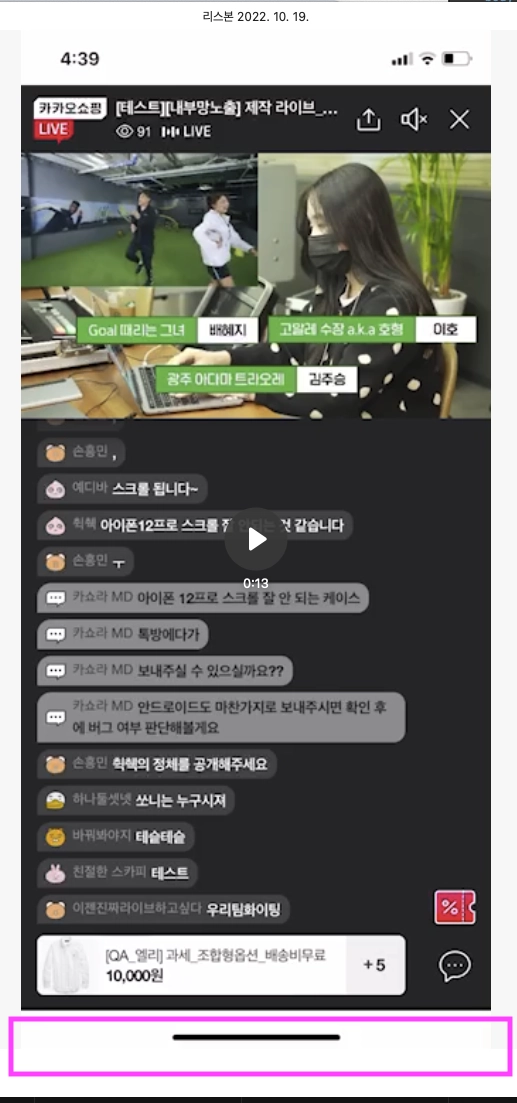
Fix — Added a branch of CSS that forces bottom: 0 only in the WebView environment.
/* Added a dedicated branch for in-app WebView */
.in-app-webview .chat-input {
  bottom: 0;
}
.in-app-webview .player-wrap,
.in-app-webview .player-wrap.player-vertical {
  bottom: 0;
}
Once bottom: 0 was correctly anchored to the true bottom of the screen, the gap disappeared along with it.
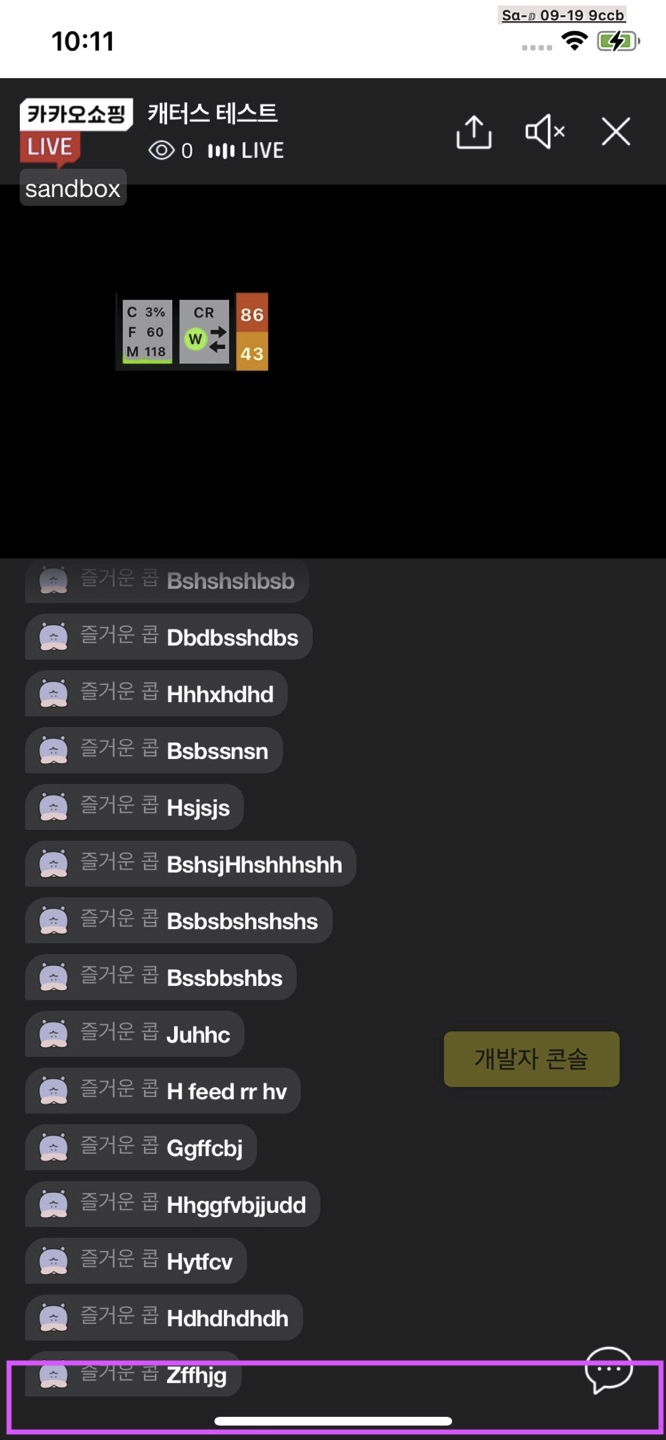
This single fix resolved not just the unresponsive send button, but also the white gap left at the bottom of the live screen, and the oddly large padding that showed up specifically while chat input was focused. All three symptoms turned out to be different faces of the same underlying cause — a wrong reference point for bottom.
Typing "ㄹ" produces "갈"
To keep the keyboard from dismissing when focus dropped off the input after tapping send, the chat component was built to always keep focus on the input box after sending. Combined with how iOS handles Korean IME composition, that produced a strange bug that only reproduced with specific input sequences. When typing a character made up of multiple jamo, like Korean, iOS briefly holds the not-yet-finalized character in an internal buffer and continues composing it as more input comes in. If you typed "가" as the last character, sent the message, and then typed just "ㄹ", the browser still considered the composition of "가" unfinished — so the newly typed "ㄹ" merged with the previous character to produce "갈". The root cause was that focus wasn't being explicitly cleared on send: the input itself was "done," but the browser's composition state stayed alive.
The fix was closer to a sleight of hand than a real solution. A hidden dummy input sits off-screen, and the moment a message is sent, focus is shifted to it and then immediately shifted back to the real input — forcibly resetting the composition buffer in the process.
<input
  style="width: 1px; height: 1px; z-index: -1"
  (focus)="onFocusBlankInput()"
  #blankInput
/>
protected send(): void {
  this.blankInput?.nativeElement.focus();
  // ...send logic
}

protected onFocusBlankInput(): void {
  this.messageInput?.nativeElement.focus();
}
Clicks that go nowhere
Under chat overload — messages piling up fast — clicking elements with event listeners attached (like a nickname button) sometimes did nothing, a bug that resurfaced more than once. The cause was in how iOS Safari synthesizes click events. iOS detects touch events and synthesizes a click event from them, but if a new node gets added to the DOM while the user's touch gesture is still in progress, iOS stops synthesizing a click event for that gesture entirely from that point on. In a screen like chat, where the list is being updated in real time, that exact condition becomes far more likely precisely when message volume spikes.
Fixed an issue where user clicks were being ignored while typing in chat — elements with event listeners were being dynamically created, which was causing the user's click event to not fire, and this was fixed.
The fix was to stop relying on click entirely and instead subscribe directly to touchstart/touchend, synthesizing a virtual click event as a workaround. The fact that the same category of iOS click bug reappeared after a significant time gap shows this isn't a single line of broken code — it's a structural combination ("a screen where the DOM keeps mutating in real time" + "iOS's click emulation") that keeps producing this exact class of bug on its own schedule.
Auto-scroll: an algorithm that kept evolving
The chat window's basic behavior sounds simple: "when a new message arrives, auto-scroll to the bottom only if the user is already looking at the bottom." Getting that one sentence to hold up reliably took quite a few iterations.
The race condition between receiving messages and judging scroll position
The initial implementation was: when a new message arrived (addMessages), check whether the current scroll position was at the bottom (isScrollPositionBottom), and if so, push a value into scrollToBottom$, debounce it, and scroll down. In practice, though, there was a bug where auto-scroll would stop and the "scroll to latest" button would stay stuck on screen even though the scroll was actually at the bottom.
Tracing the cause turned up two overlapping race conditions.
- There was a window where the new message element got added to the DOM after
scrollTophad already been changed and the scroll event had already fired — so at the moment the bottom check ran, it computed "not actually at the bottom yet." - Even after tuning the debounce timing, if another message arrived in that same window, the judgment got thrown off again.
The root problem was that "is this the bottom" was itself dependent on the timing of two separate event streams — "how far has the DOM actually been drawn" and "message received" — that don't naturally line up. I tried comparing the last message id, and tried batching incoming messages into a queue and draining it on an interval, but neither approach was the one that stuck. What finally worked was measuring the actual height of newly added nodes directly with a MutationObserver and judging bottom-ness from that. Instead of "wait for the scroll event, then judge after the fact whether we're at the bottom," this flips the order: "know the size of what's about to be rendered first, then judge." Similar to how YouTube's chat behaves, the approach ended up being about controlling the timing of when chat is actually rendered to the screen at all.
private observeAddedChatHeight = (): Observable<number> | undefined => {
  return getMutationObservable(nativeElement, {childList: true}).pipe(
    rxMap(mrList => lFilter(mrList, mr => !isEmpty(mr.addedNodes))),
    filter(mrList => !isEmpty(mrList)),
    rxMap(mrList => {
      let totalAddedChatHeight = 0;
      forEach(addedNodesList, nodeList => {
        nodeList.forEach(node => {
          totalAddedChatHeight += (node as HTMLElement).offsetHeight + this.itemMargin;
        });
      });
      return totalAddedChatHeight;
    })
  );
};
And when judging scroll position, the height about to be added is pre-added as a correction factor before deciding "are we at the bottom right now":
if (scrollHeight <= Math.ceil(scrollTop) + offsetHeight + decreasedHeightOfChatList) {
  this.scrollToBottom(...);
}
This approach is still in the code today under the names observeAddedChatHeight / observeDecreasedHeightOfChatList, along with a comment explaining that it only needs to handle the case where the chat list gets shorter because of a notice/announcement banner.
One line of CSS was enough to stall the scroll
To give the chat list a gradient fade at its top and bottom edges, we had mask-image applied separately to a top element and a bottom element. The moment the top gradient class got toggled, scroll events would simply stop firing on iOS. I never fully nailed down the exact mechanism, but the leading suspect was having two overlapping mask-image declarations effectively stacked on one element. Restructuring the CSS so top/bottom/both each got their own class — guaranteeing any single element only ever carries one mask-image at a time — made the bug stop reproducing.
A related bug, also iOS-only: scrolling the chat list all the way to the top and then back down would leave scrolling stuck. The cause, as recorded in the code comment at the time:
<!-- Toggling the top-gradient class causes scrolling to get stuck at the top.
     This looks like a conflict between the overscroll-behavior style and Angular's
     change detection. Reproduces on iOS only. To avoid it: don't change element
     size, and don't change styles while a scroll is in progress. -->
What these bugs had in common was that they only ever reproduced on iOS, and only around specific style-toggle timings. The principle it all converged on was "don't touch layout-affecting styles while a scroll is in progress." To this day, the scroll-handling code checks for overscroll-behavior support with CSS.supports first, and only falls back to intercepting touch events manually in environments that don't support it.
if (
  this.chatList &&
  agent.isiOS &&
  !CSS.supports("overscroll-behavior", "contain")
) {
  // Intercept touch events directly to prevent overscroll bounce
}
Small things that turned out not to be so small
Emoji aren't "letters"
Stringing together a long run of emoji in chat wouldn't wrap at all — it just kept overflowing horizontally. We had word-break: break-all applied to force line breaks anywhere, but it simply didn't apply to emoji.
Checking the CSS spec made the reason obvious. break-all only applies to characters that fall under the spec's "letter" category — digits, alphabetic characters, Southeast Asian scripts, and the like. Emoji and other special characters were never in scope for it to begin with. Switching to word-break: break-word instead made line breaks apply correctly across all characters, emoji included. break-all sounds like the "more aggressive, breaks anywhere" option, but it's actually the narrower one per spec. Chat message text still uses word-break: break-word today.
Closing thoughts
Looking back, almost every issue in this chat module came from a place where "the web standard doesn't behave the way real devices actually behave." bottom: 0 might not mean the true bottom of the screen. word-break: break-all might not apply to every character. A click event isn't guaranteed to fire. Every one of those had to be confirmed by reproducing it on a real device — there was no shortcut. And the fact that the same category of iOS click bug came back years later is a reminder that fixing something once doesn't mean it's gone for good; given similar enough conditions, these bugs can resurface in a different shape.
At the same time, requirements like auto-scroll or virtual-keyboard handling sound like one-liners ("only auto-scroll when at the bottom," "the video must stay visible even when the keyboard is up"), but implementing them meant coordinating events across entirely different timing domains — message delivery, DOM rendering, layout shifts from the virtual keyboard, and user gestures. From the early MutationObserver-based height calculation, to the hide-the-forced-scroll animation trick, to viewport-based video repositioning, to splitting user scroll from system scroll — rather than finding one perfect solution up front, the approach was to narrow the decision criteria one reproducible case at a time. The notes kept along that path are what ended up forming the backbone of this post.
About the author
- Web Frontend Developer // Crafting Scalable Cross-Platform Web Solutions & Rich User Experiences
Comments
Join the discussionNo comments yet. Be the first to comment.